

Choosing the right framework, hosting environment, and web application development tools before writing a single line of code is one of the most consequential decisions a growing business can make. Get it right and your site scales cleanly as traffic grows, integrates easily with third-party services, and costs predictably to maintain. Get it wrong and you spend money rebuilding instead of marketing.
This guide walks through the technical decisions that matter most in 2026, written for business owners and decision-makers who need enough depth to hire smart and ask the right questions.
Key Takeaways
- Your framework choice determines long-term flexibility, developer availability, and performance ceiling.
- Hosting architecture (shared, VPS, managed cloud, or serverless) must match your expected traffic patterns and budget.
- A well-chosen modern web development stack reduces rebuild cycles and lowers total cost of ownership.
- Security, accessibility, and SEO readiness should be built into the stack, not bolted on after launch.
- Scalability is not just a server question. It is a code architecture, database design, and CDN question too.
For more on Key Takeaways, see Federal Trade Commission.
Why Framework Selection Drives Everything Downstream
The framework you choose today determines how easily your team can maintain, extend, and hand off the codebase three years from now. Choose based on project scope, team skills, and hiring market depth rather than trends alone.
Web application development in 2026 is not short on options, which is exactly the problem. React, Next.js, Vue, Nuxt, Angular, and SvelteKit are all viable. Each carries different tradeoffs around rendering strategy, ecosystem maturity, and developer availability.
React remains the most widely adopted front-end library. Its component model is well understood, the talent pool is deep, and the ecosystem of supporting libraries covers almost any requirement. Next.js, built on top of React by Vercel, adds server-side rendering (SSR), static site generation (SSG), and edge routing in a single framework. For most New York SMBs building a marketing site with dynamic product or service pages, Next.js offers the right balance of performance and flexibility without excessive complexity.
Vue.js is a strong alternative when your development team already knows it, particularly for content-heavy applications with moderate interactivity. SvelteKit is gaining traction for performance-critical projects because it compiles to minimal JavaScript at build time rather than shipping a runtime library to the browser. Angular fits enterprises that need opinionated structure across large teams, but it typically adds onboarding friction for small agencies or solo developers.
Before committing to any framework, confirm three things: your preferred CMS (or headless API) has a supported SDK or integration, your hosting provider supports the rendering strategy you need, and local developers or agencies can maintain the codebase if you change vendors.
For more on why Framework Selection Drives Everything Downstream, see U.S. Department of Energy.
Choosing the Right Web Application Development Stack
A production stack is more than a front-end framework. It includes a backend layer, a database, an API strategy, authentication, and a content layer. The table below maps common business use cases to practical stack choices.

| Business Use Case | Front End | Backend / API | Database | CMS / Content Layer |
|---|---|---|---|---|
| Marketing site, blog, local SEO | Next.js | Node.js or Vercel Edge | PostgreSQL or SQLite | Sanity, Contentful, or WordPress (headless) |
| E-commerce (small catalog) | Next.js + Shopify | Shopify Storefront API | Shopify-managed | Shopify |
| E-commerce (large, custom) | Next.js or Nuxt | Node.js or Go | PostgreSQL | Contentful or custom |
| SaaS or client portal | React or Angular | Node.js / Express or Django | PostgreSQL or MySQL | Custom admin |
| High-traffic content site | Astro or Next.js | Node.js or serverless functions | PostgreSQL with read replica | Headless CMS |
For most New York small businesses, a Next.js front end paired with a headless CMS covers 80% of requirements. It gives you a fast, SEO-ready front end, decouples content management from code deployments, and lets non-technical staff update pages without developer involvement. For a deeper look at how CMS platforms compare on setup speed and cost, see this comparison of CMS platforms ranked by setup speed and monthly cost.
TypeScript has become the professional standard for production JavaScript projects. It catches type errors at compile time rather than runtime, makes refactoring safer, and improves IDE tooling for the development team. If you are hiring a developer or agency, requiring TypeScript is a reasonable baseline for any project expected to last more than two years.
Hosting Architecture Options for Business Websites
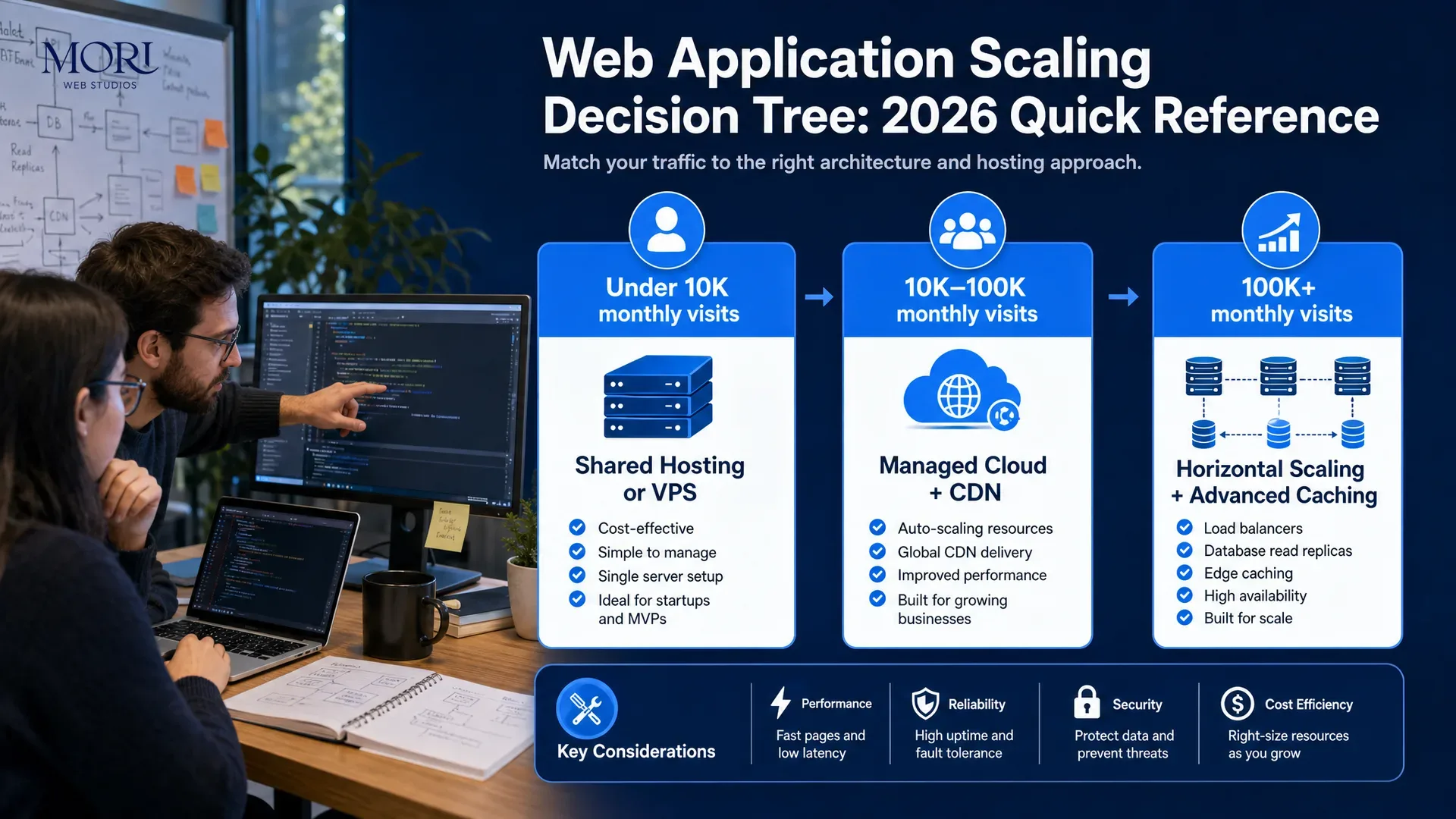
Choosing the best web hosting for business means matching your server architecture to your actual traffic pattern and budget. Most growing SMBs benefit from managed cloud hosting with a CDN over shared hosting within 12 to 18 months of launch.
Best web hosting for business decisions in 2026 come down to four primary architecture types.
| Hosting Type | Typical Use Case | Approx. Monthly Cost | Scaling Model |
|---|---|---|---|
| Shared hosting | Starter brochure sites, low traffic | $5, $20 | Manual, capped |
| VPS (virtual private server) | Growing sites, moderate traffic | $20, $80 | Manual, configurable |
| Managed cloud (AWS, GCP, Azure) | Business apps, variable traffic | $30, $300+ | Automatic, pay-as-you-go |
| Serverless / edge (Vercel, Netlify, Cloudflare) | Jamstack, API-driven sites | $0, $50 (hobby to pro) | Automatic, global edge |
Shared hosting is affordable but limits performance and security controls. For any business that depends on its website for leads or sales, managed cloud hosting or a serverless edge platform delivers the reliability and speed the investment deserves.
Vercel and Netlify are popular for Next.js and Jamstack deployments because deployment is automatic on every git push, preview environments are created per pull request, and global CDN distribution is included. AWS Amplify covers similar ground for teams already embedded in the AWS ecosystem. For applications with complex backend requirements, AWS EC2 or Google Cloud Run behind a load balancer gives more control.
Content delivery networks (CDNs) are non-negotiable for business sites targeting users across multiple states or internationally. A CDN caches static assets at edge locations closer to your users, reducing time to first byte (TTFB) meaningfully. Cloudflare’s free tier alone can reduce TTFB for cached pages by hundreds of milliseconds, which matters for both user experience and PageSpeed Insights scores.
Essential Website Development Tools for Modern Projects
Website development tools fall into four categories: code quality, testing, monitoring, and deployment.
For code quality, the standard stack is ESLint (linting), Prettier (formatting), and Husky with lint-staged (pre-commit hooks). These catch errors and enforce style before code reaches production. Combined with TypeScript, they dramatically reduce the class of bugs that reach QA.
Testing deserves more investment than most SMB projects allocate. Vitest or Jest cover unit and integration tests for component logic. Playwright or Cypress handle end-to-end browser tests. At minimum, every critical user path (contact form submission, checkout, login) should have an automated test so a code change does not silently break conversions.
Monitoring tools like Sentry (error tracking) and Datadog or LogRocket (session replay and performance) give you visibility after launch. Many business owners discover performance regressions only when customers complain. Proactive monitoring catches issues before they affect revenue.
For deployment, GitHub Actions or GitLab CI/CD pipelines automate testing, building, and deploying on every code push. This eliminates manual FTP uploads, reduces human error, and means your team always deploys from a consistent, tested build.
Performance, Security, and Accessibility Foundations
Performance is not a launch-day checkbox. Core Web Vitals (LCP, INP, and CLS) are Google ranking signals, and poor scores cost you search visibility as well as conversions. For a Next.js application, the highest-impact performance decisions are: choosing SSG or Incremental Static Regeneration (ISR) over client-side rendering for public pages, optimizing images with the `next/image` component, and deferring non-critical JavaScript.
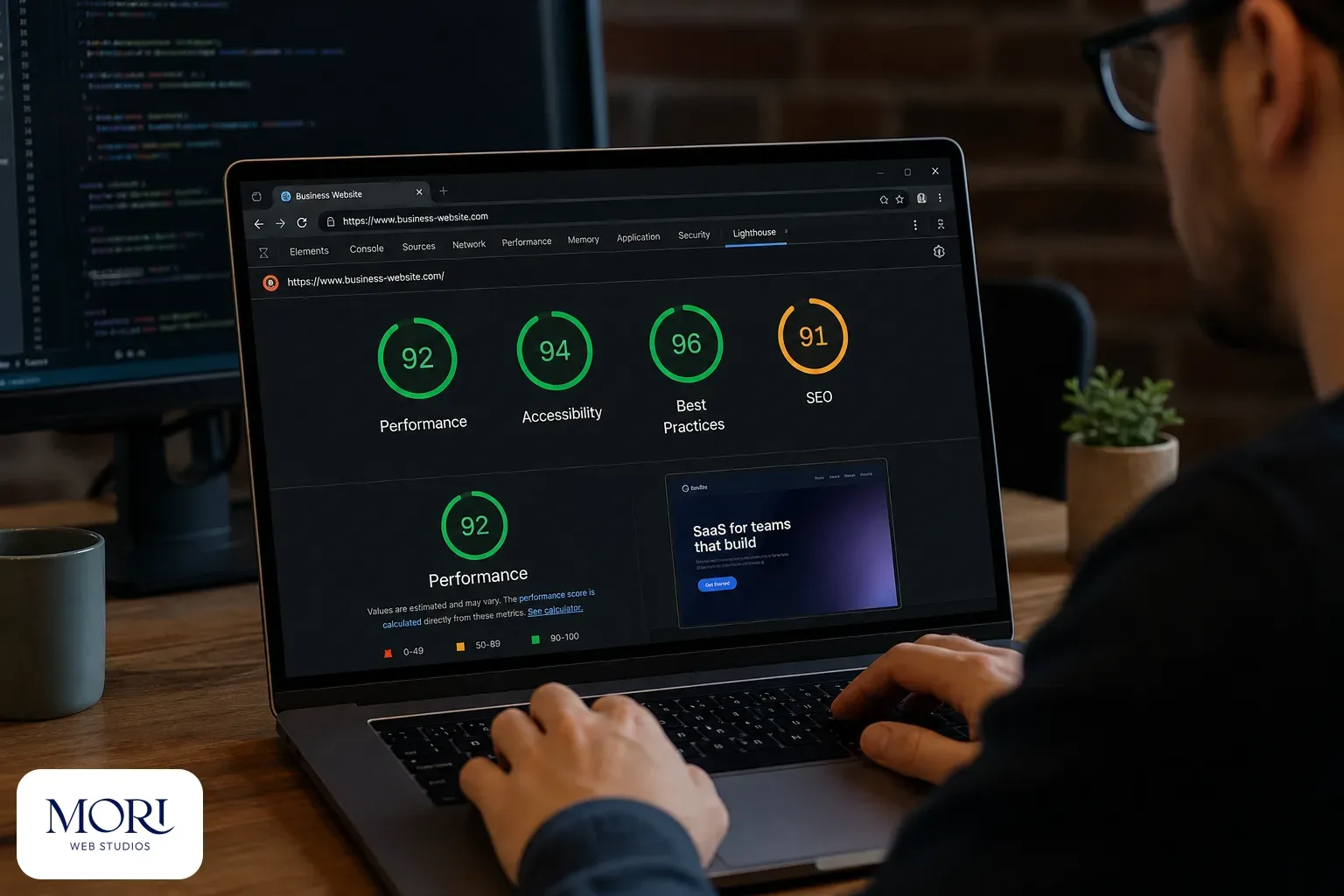
Security is an ongoing operational responsibility, not a one-time setup. HTTPS is the floor. Beyond that, enforce Content Security Policy (CSP) headers, keep all dependencies updated, and implement rate limiting on forms and API routes to prevent abuse.
For more on baseline website protections, the guide on securing your website with an SSL certificate and three essential protections covers practical next steps.
Accessibility affects your legal exposure as well as your audience reach. The WCAG 2.1 AA standard is the recognized benchmark for U.S. business websites. Building with semantic HTML, adequate color contrast, keyboard navigation, and meaningful alt text from the start costs far less than retrofitting a site that was built without it.
For businesses investing in AI search visibility, structure matters as much as words. Clean semantic markup, schema.org structured data (Organization, LocalBusiness, FAQPage, Article), and fast-loading pages improve how AI systems like Google’s AI Overviews and ChatGPT surface your content. Connecting your web application development work to AI search engine optimization from the start is now a competitive advantage, not an afterthought.
Scaling Your Application as Traffic and Complexity Grow
Scalability is a design decision made before launch, not an emergency fix applied after traffic spikes. Choosing stateless application architecture, a managed database with connection pooling, and a CDN from day one means scaling is a configuration change rather than a rebuild.
Horizontal scaling (adding more server instances behind a load balancer) is simpler when your application is stateless. Store session data in Redis or a managed session service, not in server memory. Store uploaded files in object storage (AWS S3 or similar), not on the application server’s filesystem.
These two patterns alone prevent the most common scaling bottlenecks.
Database performance degrades before server performance in most content and e-commerce applications. Add database indexes for every query run on high-traffic tables. Use connection pooling (PgBouncer for PostgreSQL is a common choice) to prevent the database from being overwhelmed during traffic spikes.
If your application serves a global audience, read replicas in secondary regions reduce query latency significantly.
Caching strategy works at three layers: the CDN (for static assets and full-page HTML), the application layer (Redis for computed results and session data), and the database query layer. Most SMB applications only implement the CDN layer and leave performance on the table. Adding even a simple in-memory or Redis cache for expensive queries can cut response times by 50% or more on content-heavy pages.
For e-commerce platforms specifically, cart and checkout flows require careful state management under load. If you are running on a custom stack rather than a managed platform like Shopify, stress-test your checkout with realistic concurrent user scenarios before major promotional periods. For tactics on improving conversion after the technical foundation is solid, the e-commerce cart abandonment roadmap covers the conversion side of the equation.
Tips, Troubleshooting, and Common Mistakes
Framework and Stack Mistakes to Avoid
Choosing a framework based on hype rather than hiring availability is the most expensive mistake in web application development. If you are based in New York and need ongoing maintenance, verify that local developers or remote agencies with proven portfolios actively work in that framework. Exotic technology choices create vendor lock-in and drive up maintenance costs.
Over-engineering is equally costly. A five-page marketing site for a local service business does not need a microservices architecture, a GraphQL API, or a Kubernetes cluster. Match complexity to actual requirements.
When in doubt, start simpler and add layers only when a specific bottleneck demands it.
Hosting and Performance Troubleshooting
If your site is slow despite being on managed cloud hosting, the culprit is usually one of three things: unoptimized images served without compression or proper sizing, render-blocking JavaScript loaded synchronously in the document head, or database queries running without indexes on large tables. Use Lighthouse in Chrome DevTools to diagnose which Core Web Vitals are failing and trace the problem to its source before making infrastructure changes.
If your hosting bill spikes unexpectedly, check for a traffic bot or scraper hitting your site, unoptimized API routes making excessive database calls, or media files stored directly on the application server instead of object storage. Each is a common and fixable issue.
Maintenance and Long-Term Health
A production web application requires ongoing care. Dependency updates (npm packages, CMS plugins, server OS patches) should run on a regular schedule, not only when something breaks. Outdated dependencies are the most common attack vector for business websites. Pair scheduled updates with automated testing so you can catch regressions before they reach users.
Work with a web care and maintenance service if your internal team lacks the bandwidth for regular updates, uptime monitoring, and security patches. The cost of prevention is consistently lower than emergency repairs after a breach or outage.
Framework and Hosting Quick-Reference Summary
The table below summarizes the key decision factors covered in this guide, designed as a reference before you finalize your architecture choices.
| Decision Area | Recommended Starting Point | When to Upgrade |
|---|---|---|
| Front-end framework | Next.js (React, TypeScript) | Rarely; migrate only if requirements fundamentally change |
| CMS / content layer | Headless CMS (Sanity, Contentful) | Add custom admin when content workflows outgrow off-the-shelf tools |
| Hosting (low traffic) | Vercel or Netlify (serverless edge) | Move to managed cloud when backend complexity grows |
| Hosting (medium traffic) | AWS Amplify or DigitalOcean App Platform | Add load balancer and read replicas at ~100K monthly visits |
| Database | PostgreSQL (managed, e.g., Supabase, Neon) | Add read replicas and connection pooling above 50K daily active users |
| CDN | Cloudflare (free or Pro tier) | Upgrade plan when cache hit rate requires finer configuration |
| CI/CD | GitHub Actions | Add staging environments and approval workflows at team scale |
| Monitoring | Sentry (error tracking) + Lighthouse CI | Add Datadog or LogRocket when session-level diagnostics are needed |
This table reflects broadly accepted patterns in the industry rather than hard vendor endorsements. Your actual choice depends on team familiarity, budget, and the specific requirements of your application.
For businesses considering a full rebuild rather than incremental improvements, reviewing the SEO website redesign checklist before the development phase prevents costly ranking losses during migration.
Frequently Asked Questions
What is the best framework for web application development in 2026?
Next.js is the most practical choice for the majority of business websites and applications in 2026. It supports static site generation, server-side rendering, and edge functions within a single framework, integrates cleanly with every major headless CMS, and has the deepest React talent pool behind it.
For content-heavy sites where JavaScript interactivity is minimal, Astro is a strong alternative because it ships zero JavaScript by default and delivers excellent Core Web Vitals scores. For complex enterprise applications with large development teams, Angular remains a defensible choice due to its strong conventions and TypeScript-first design.
How do I choose between shared hosting, VPS, and managed cloud hosting?
The decision comes down to traffic volume, technical complexity, and how much server management your team can handle. Shared hosting suits low-traffic starter sites where budget is the primary constraint. A VPS gives you dedicated resources and root access, which works for moderate-traffic sites with a developer who can manage server configuration.
Managed cloud hosting (AWS, GCP, Azure) or a serverless edge platform (Vercel, Netlify) is the right choice for any business that cannot afford extended downtime or needs to scale automatically with traffic. For most growing New York businesses, the operational simplicity and global performance of a managed platform justifies the modest cost premium over a self-managed VPS.
What is a modern web development stack and why does it matter?
A modern web development stack is the combination of front-end framework, backend runtime, database, CMS, hosting, and tooling that powers your web application from code to production. The stack you choose affects how fast the site loads, how easy it is to maintain, how quickly new features can be built, and how much it costs to run over time.
Outdated stacks (aging PHP monoliths, jQuery-based front ends without a build system) accumulate technical debt that makes every future change more expensive. A well-chosen modern stack with TypeScript, a component-based front end, a managed database, and automated deployments significantly reduces that long-term cost.
How important is TypeScript for a business web application?
TypeScript is effectively the professional standard for production JavaScript projects in 2026. It catches a wide category of bugs at compile time rather than at runtime (or worse, in production), improves IDE autocompletion and refactoring safety, and makes the codebase easier for a new developer to understand when you change vendors or hire internally.
For projects expected to run for more than 12 to 18 months, requiring TypeScript from the start is a sound business decision. The learning curve is real but short, and the reduction in runtime errors is measurable.
How does web application architecture affect SEO?
Architecture choices have a direct impact on search performance. Server-side rendering (SSR) and static site generation (SSG) ensure that search engine crawlers receive fully rendered HTML rather than a blank page that requires JavaScript to populate, which improves indexing reliability. Slow pages with poor Core Web Vitals scores rank lower, so framework and hosting decisions that improve TTFB and LCP directly support organic visibility.
Schema markup, semantic HTML, clean URL structures, and fast server response times all depend on how the application is built, not just how content is written. Building SEO readiness into your architecture from day one is far more efficient than retrofitting it after launch.
When should a business invest in a custom web application versus a website builder?
A website builder (Squarespace, Wix, Webflow) is appropriate when your site is primarily informational, your team has no developer resources, and your business does not require custom integrations, complex user authentication, or dynamic data beyond what the platform provides natively.
A custom web application makes sense when you need functionality the builder cannot support: account-based access, custom pricing logic, complex inventory, real-time data, or tight integration with internal systems. Custom development has a higher upfront cost but delivers ownership, flexibility, and performance that no hosted builder can match at scale. For businesses in competitive New York markets, custom web design and development often provides the differentiation that template-based sites cannot.
Ready to Build on the Right Foundation?
The technical decisions covered in this guide (framework selection, hosting architecture, tooling, and scalability planning) determine how well your digital presence performs for years, not just at launch. Getting them right requires both technical depth and business clarity.
If you are planning a new build, a redesign, or an architecture review for your existing site, contact Mori Web Studios to discuss your goals. Jeanherline Santiago and the team work with New York businesses to design and build high-performance web applications that are built to scale, optimized for search, and engineered for long-term reliability. Contact Mori Web Studios for a custom strategy aligned with your goals.