

Your website faces real threats every day, from phishing attempts and data breaches to expired certificates that push visitors away. For small and mid-sized business owners, ssl certificate setup is the starting point, but it is only one layer of a complete protection plan. This guide walks you through the four protections every SMB website needs in 2026: a valid SSL certificate, automated backups, security monitoring, and compliance basics that keep you on the right side of consumer protection law.
Key Takeaways
- An ssl certificate encrypts data between your site and your visitors, and Google ranks HTTPS sites ahead of unprotected ones.
- Automated backups protect your business from ransomware, server failures, and accidental deletions.
- Security monitoring catches threats before they cause visible damage or data loss.
- PCI compliance is required if you accept payments online, with real financial penalties for non-compliance.
- Website protection is an ongoing process, not a one-time setup.
For more on Key Takeaways, see U.S. Environmental Protection Agency.
Why Website Security Cannot Wait
A single data breach or extended website downtime can cost a small business far more than the annual investment in professional website protection.
If your site currently shows "Not Secure" in a browser’s address bar, visitors notice immediately. That warning appears on any site without a valid ssl certificate, and it signals risk to both your customers and Google’s ranking systems.
The threat landscape for small businesses has grown considerably. Attackers increasingly target SMBs precisely because larger organizations invest heavily in security infrastructure. A compromised website can expose customer data, destroy search rankings, and trigger legal liability under state and federal consumer protection standards set by the Federal Trade Commission.
For New York business owners competing in dense local markets, your website’s credibility is inseparable from its security posture. Visitors who see a browser security warning will close the tab and move to a competitor’s site. Getting the fundamentals right protects your revenue, your reputation, and your customers.
Install and Maintain Your SSL Certificate
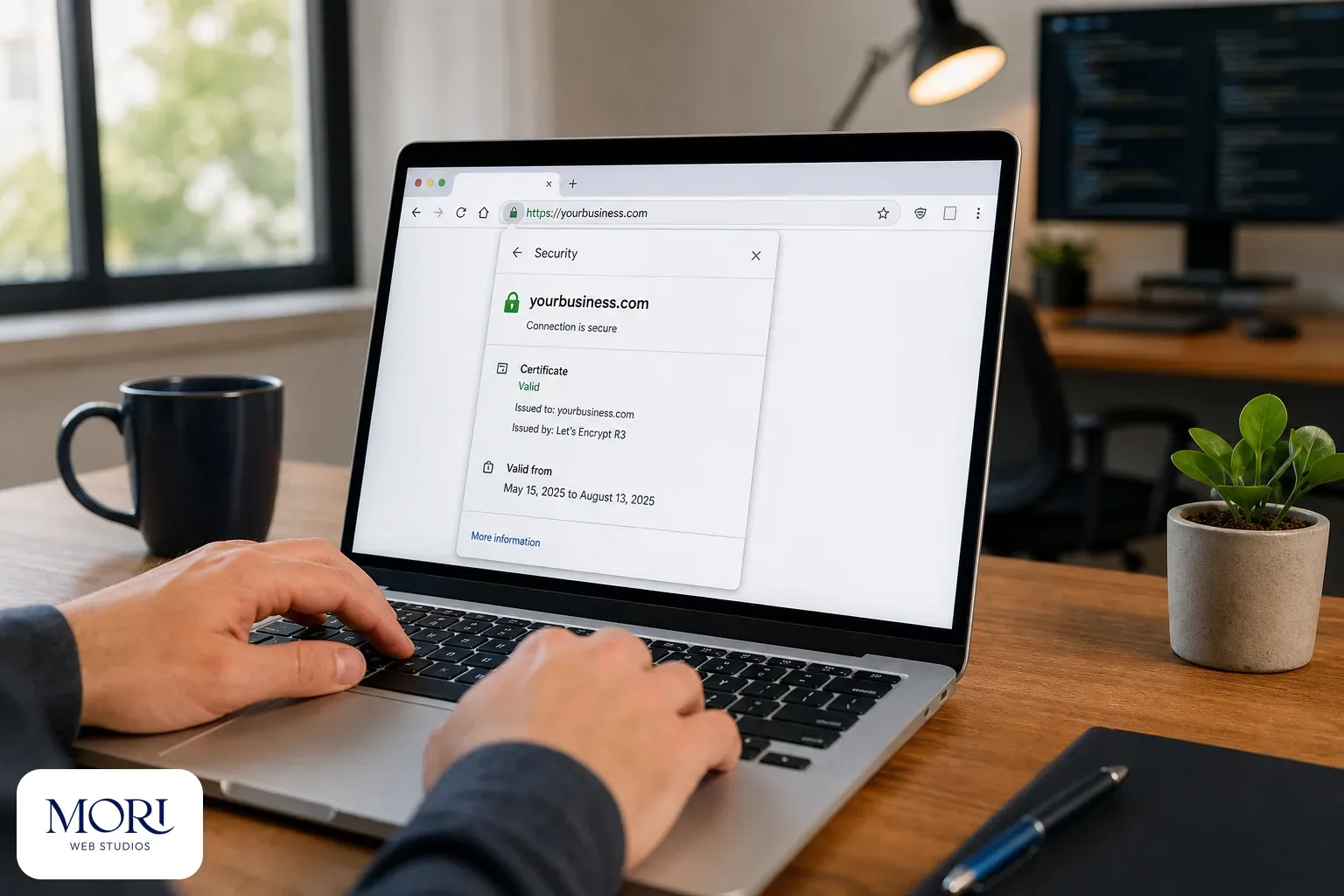
An ssl certificate does two things simultaneously: it encrypts the connection between your server and the visitor’s browser, and it authenticates that your domain is who it claims to be. When both conditions are met, browsers display the padlock icon and load your site over HTTPS.
Choosing the Right SSL Certificate Type
Not all certificates offer the same level of trust. The three main types differ in validation depth and the assurance they signal to visitors.
| Certificate Type | Validation Level | Best For | Typical Cost |
|---|---|---|---|
| Domain Validation (DV) | Domain ownership only | Blogs, informational sites | Free to ~$50/year |
| Organization Validation (OV) | Business identity verified | Business websites, local services | ~$50, $200/year |
| Extended Validation (EV) | Full legal entity check | E-commerce, financial services | ~$150, $400/year |
For most SMB websites, a Domain Validation certificate from a trusted Certificate Authority is sufficient. If you run an e-commerce platform or collect payment data, an OV or EV certificate sends a stronger trust signal to customers.
Installing and Renewing Your Certificate
Many hosting providers offer free DV certificates through Let’s Encrypt, an open Certificate Authority that issues certificates automatically. The critical step most business owners miss is auto-renewal. An expired ssl certificate throws the same browser warning as having no certificate at all.
Enable auto-renewal through your hosting control panel or ask your developer to configure it.
After installation, run your domain through a tool like SSL Labs to verify the certificate chain is complete and no configuration errors exist. A misconfigured ssl certificate can still trigger warnings even when the certificate itself is valid.
Set Up Automated Website Backups
Automated, offsite backups are the difference between a recoverable incident and a business-threatening crisis.
A backup is your recovery plan when everything else fails. Ransomware attacks, plugin conflicts, server hardware failures, and accidental content deletion all share one solution: a clean, recent backup you can restore from immediately.
Backup Frequency and Storage Rules
The right backup frequency depends on how often your site changes. A static informational site needs less frequent backups than an active e-commerce store processing daily orders.
| Site Type | Recommended Frequency | Minimum Retention |
|---|---|---|
| Informational / Blog | Daily | 30 days |
| E-Commerce (active orders) | Multiple times daily | 60 days |
| Membership / User Data | Daily or hourly | 90 days |
Follow the 3-2-1 backup rule: three copies of your data, stored on two different media types, with one copy stored offsite. For most small businesses, this means your hosting provider’s automated backup, a secondary cloud storage destination (such as Amazon S3 or Google Cloud), and a periodic local copy.
Never rely solely on your hosting provider’s backup. Hosting outages and account compromises can make those backups temporarily inaccessible at exactly the moment you need them most.
Mori Web Studios’ web care and optimization services include managed backup configuration so business owners do not have to track this manually.
Implement Security Monitoring and Hardening
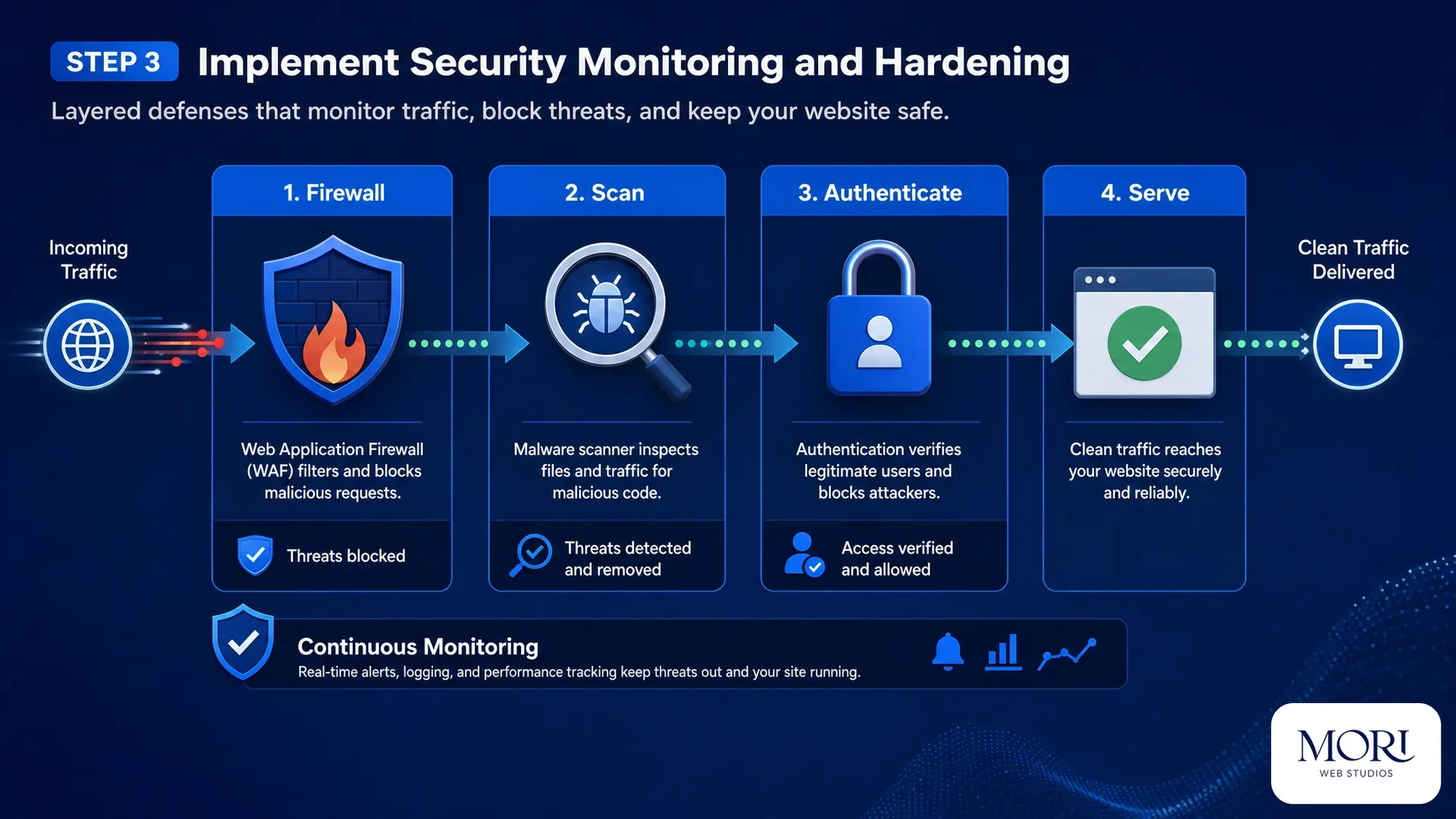
Reactive security, where you respond only after something breaks, leaves your site exposed for days or weeks before you notice a problem. Active monitoring catches intrusions, malware injections, and unauthorized changes in real time.
Core Security Hardening Steps
Start with the fundamentals before adding monitoring tools. These actions close the most common attack vectors:
- Update everything regularly. Outdated CMS versions, themes, and plugins are the leading entry point for automated attacks.
- Use strong, unique passwords for your admin accounts, hosting panel, and database. A password manager removes the excuse of "too hard to remember."
- Enable two-factor authentication (2FA) on every admin login. This single step blocks the majority of credential-stuffing attacks.
- Limit login attempts to prevent brute-force attacks on your admin portal.
- Remove unused plugins and themes. Inactive code that is never updated is an open door.
Monitoring Tools Worth Using
Web application firewalls (WAF) like Cloudflare or Sucuri sit in front of your site and filter malicious traffic before it reaches your server. Malware scanning tools check your files and database for injected code on a scheduled basis and alert you to changes. Uptime monitors notify you within minutes if your site goes offline unexpectedly.
For businesses running custom web design and development projects, security hardening should be built into the launch checklist, not added as an afterthought after the site goes live.
Understand Your Compliance Obligations
Website security is not just a technical issue. It carries legal and financial obligations that vary by what your site does and what data it collects.
PCI Compliance for Online Payments
If your website accepts credit or debit card payments, PCI compliance (Payment Card Industry Data Security Standard) is mandatory. The PCI DSS framework sets requirements for how payment data is transmitted, stored, and protected. Non-compliance can result in fines from card networks and increased liability in the event of a breach.
For most small businesses, the simplest path to PCI compliance is using a compliant payment processor like Stripe or Square that handles card data entirely on their infrastructure. Your site never touches raw card numbers, which dramatically reduces your compliance scope.
Privacy Laws and Data Disclosure
New York businesses collecting personal data from residents or customers have disclosure obligations under evolving state and federal privacy frameworks. The Federal Trade Commission publishes practical guidance for small businesses on data security practices, privacy policies, and what constitutes a reportable breach.
At a minimum, your website should have:
- A clear privacy policy explaining what data you collect and how it is used.
- A cookie consent mechanism if you use tracking cookies or analytics.
- Secure data transmission enforced by your ssl certificate across every page, not just checkout.
Working with an agency experienced in local SEO services and digital compliance means your website architecture accounts for these requirements from the start, rather than requiring expensive retrofits later.
Website Security Checklist at a Glance
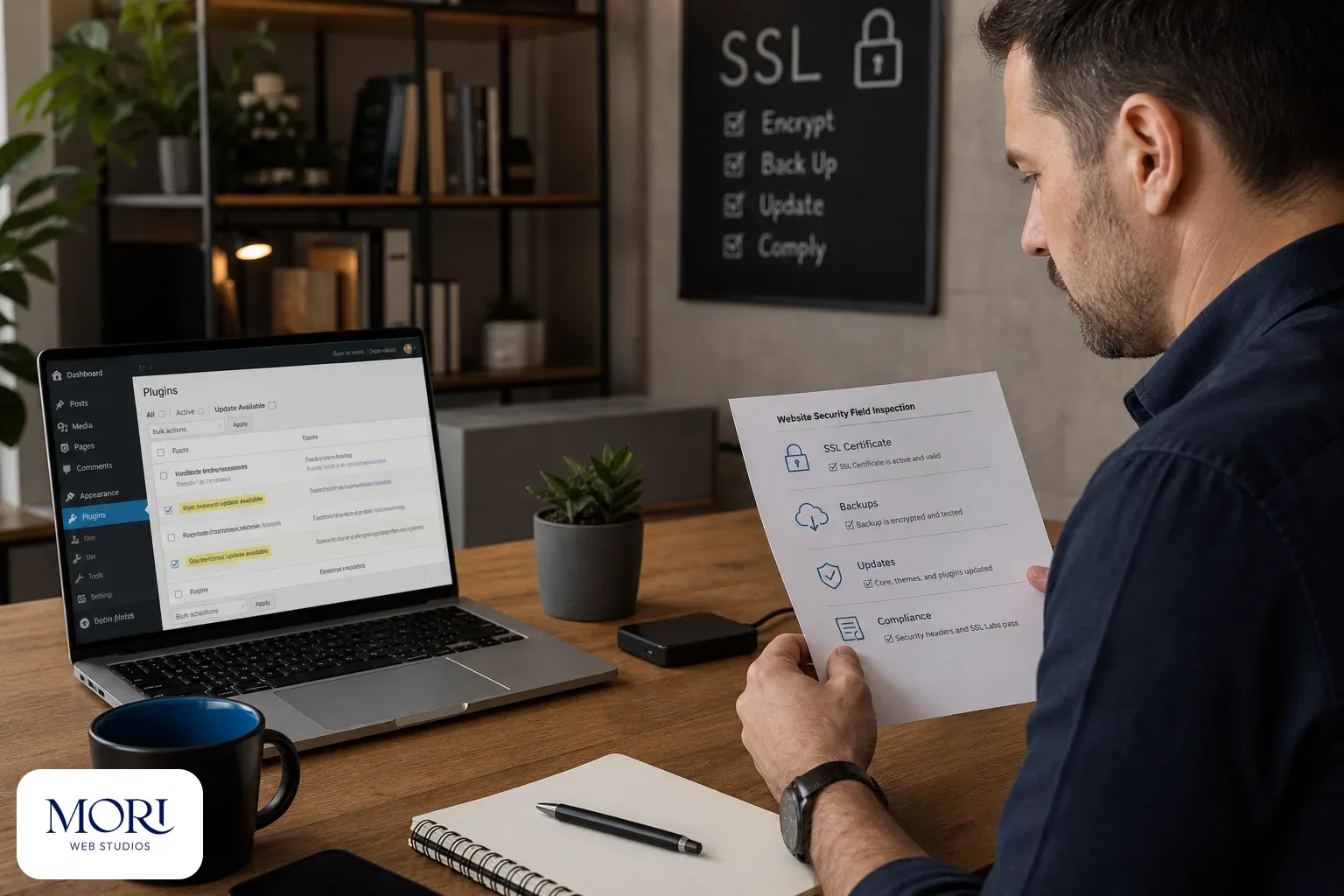
Use this checklist before launch and during your quarterly website review.
| Protection Area | Action Item | Status |
|---|---|---|
| SSL Certificate | Installed, HTTPS enforced sitewide | [ ] |
| SSL Certificate | Auto-renewal enabled | [ ] |
| Backups | Automated daily (or more frequent) backups configured | [ ] |
| Backups | Offsite copy verified and tested | [ ] |
| Monitoring | WAF or firewall active | [ ] |
| Monitoring | Malware scanning scheduled | [ ] |
| Hardening | CMS, themes, plugins updated | [ ] |
| Hardening | 2FA enabled on all admin accounts | [ ] |
| Compliance | Privacy policy published | [ ] |
| Compliance | PCI-compliant payment processor in use | [ ] |
A well-structured website that follows responsive design best practices is also easier to secure because there is less legacy code and fewer technical debt issues to manage.
Frequently Asked Questions
What is an SSL certificate and why does my website need one?
An ssl certificate is a digital file installed on your web server that encrypts data passed between your site and visitors’ browsers. Without it, browsers display a "Not Secure" warning that discourages visitors from staying on your site.
Google confirmed HTTPS as a ranking signal years ago, meaning sites without a valid ssl certificate are at a measurable disadvantage in search results. For any business investing in SEO, an unencrypted site undermines that effort directly.
How do I know if my SSL certificate is expired or misconfigured?
The simplest check is visiting your website in Chrome or Firefox. If you see a red padlock, a warning page, or "Not Secure" in the address bar, your ssl certificate has either expired, is misconfigured, or was never installed correctly.
For a detailed technical diagnosis, run your domain through SSL Labs’ free server test, which checks certificate validity, chain configuration, and protocol strength. Your hosting provider’s support team can also confirm the installation status.
How often should I back up my website?
For most informational or blog-style business websites, daily automated backups retained for at least 30 days are a solid baseline. If you run an e-commerce store with daily order volume, back up multiple times per day and retain copies for 60 days or longer.
The key is to test your backups periodically. A backup that cannot be restored successfully is not a backup.
What does PCI compliance mean for a small business website?
PCI compliance refers to the Payment Card Industry Data Security Standard, a set of security requirements that apply to any business that accepts, processes, or transmits credit card data. For small businesses, the most practical path is using a third-party payment processor that handles all card data on their own PCI-certified infrastructure.
If you use Stripe, Square, or PayPal to process payments and your site never stores raw card numbers, your compliance scope is significantly reduced. You still need to maintain a valid ssl certificate, keep your platform updated, and complete an annual self-assessment questionnaire. Ignoring PCI requirements entirely is not an option; card network fines and breach liability fall on the merchant, not the processor.
Can I handle website security myself, or do I need a professional?
Basic steps like enabling a free ssl certificate through your hosting provider, updating your CMS, and turning on 2FA are genuinely within reach for most business owners. Where self-management breaks down is in ongoing monitoring, misconfiguration detection, and knowing what to do when something goes wrong at 2 a.m. on a Friday.
Professional website care removes the guesswork. When working with clients on their website infrastructure, our team consistently finds that the most damaging issues, such as outdated plugins with known vulnerabilities or backups that were never actually storing offsite copies, are ones the business owner had no visibility into. A managed care plan closes those gaps without requiring you to become a security expert yourself.
Does my website need a privacy policy even if I am not collecting payments?
Yes. If your website uses Google Analytics, contact forms, newsletter signups, or any tracking pixel, you are collecting personal data. That triggers disclosure obligations under federal guidelines from the Federal Trade Commission and, depending on where your visitors are located, state-level privacy frameworks.
A privacy policy does not need to be complicated, but it does need to exist and accurately describe your data practices. Many small business websites also need a cookie notice that gives visitors visibility into tracking before it occurs. Your web developer or agency should include both as part of any new site build or redesign.
How does website security affect my search rankings?
Google factors HTTPS into its ranking algorithm, so a site without a valid ssl certificate is already at a disadvantage compared to competitors that have one. Beyond that direct signal, security issues affect rankings indirectly in several ways.
A hacked site may be flagged by Google Search Console and temporarily removed from search results. Malware injections that redirect visitors to spammy pages destroy both rankings and user trust. Slow page load times caused by bloated or compromised code lower your Core Web Vitals scores, which also factor into search performance.
If you are investing in SEO and GEO visibility, protecting your site’s technical foundation is part of protecting that investment.
Conclusion
Website security is one of the highest-leverage investments a small business can make in its digital presence. A valid ssl certificate establishes the baseline, encrypted trust your visitors and search engines expect. Automated backups give you a recovery path when something goes wrong.
Active monitoring and hardening reduce the probability of a breach in the first place. And understanding your compliance obligations, particularly around PCI compliance and data privacy, keeps your business protected from regulatory and financial exposure.
None of these protections require enterprise-level budgets or a dedicated IT team. They require the right setup, the right tools, and consistent attention. For New York business owners building a credible digital presence, getting this foundation right is not optional.
It is the floor everything else stands on.
If you want expert help securing your site, setting up managed backups, or ensuring your website meets current compliance standards, contact Mori Web Studios for a professional assessment. Our web care and optimization services are built specifically for growing businesses that need reliable, professionally managed digital infrastructure.