

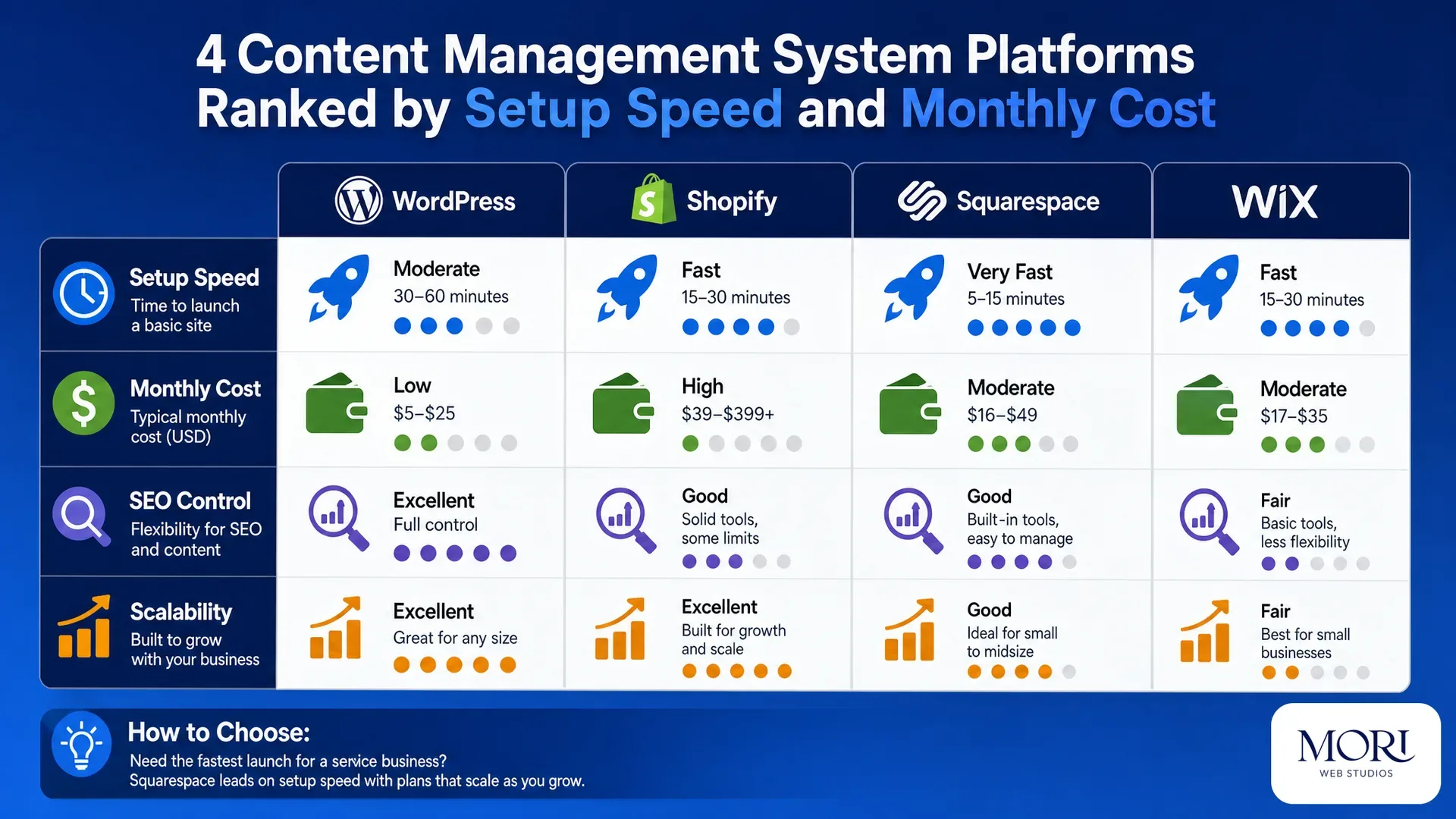
Choosing the right content management system software is one of the first real decisions you make as a business owner building or rebuilding your online presence. Get it wrong, and you spend months outgrowing a platform that cannot scale, or paying for complexity your team will never use. This article evaluates four of the most widely used CMS platforms for small and mid-sized businesses, ranked by how fast you can get a site live and what it actually costs each month.
Key Takeaways
- Setup speed and monthly cost are not the only factors, scalability and SEO control matter just as much for long-term growth.
- WordPress offers the most flexibility but demands the most technical management; Squarespace is the fastest to launch with the least friction.
- Shopify leads for e-commerce-first businesses but carries higher recurring costs at scale.
- Wix is beginner-friendly for simple sites, though it has real limitations once your business grows.
- The best CMS for your business depends on your team’s technical capacity, your growth timeline, and whether you need a custom-built foundation from day one.
For more on Key Takeaways, see U.S. Environmental Protection Agency.
How We Evaluated These Platforms
The best content management system software for small businesses balances setup speed, transparent monthly costs, and room to scale, not just the lowest entry price or the most features.
This cms comparison focuses on four criteria that matter most to small and mid-sized business owners:
- Setup speed: How long does it take a non-developer to publish a functional, professional site?
- Monthly cost: What does the platform actually cost at launch and after 12 months of growth?
- Ease of use: Can your team update content, add pages, and manage basic SEO without outside help?
- Scalability: Can the platform handle increased traffic, new service lines, or an e-commerce expansion without a full rebuild?
Each platform is assessed on these four points, with a clear verdict at the end for different business types.
For more on how We Evaluated These Platforms, see U.S. Department of Energy.
WordPress: Maximum Control, Steeper Learning Curve
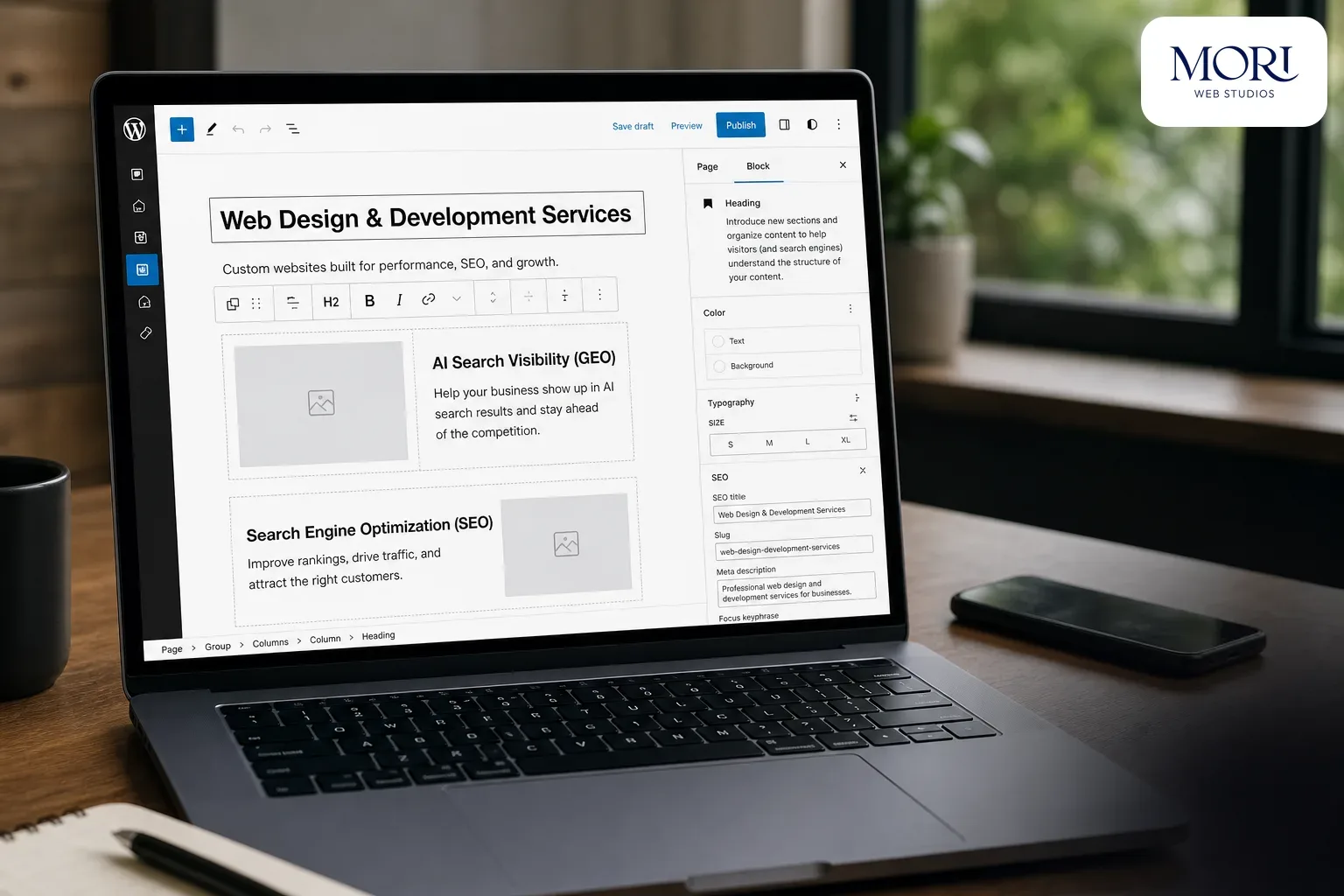
WordPress (self-hosted via WordPress.org) powers roughly 43% of all websites on the internet, and that reach reflects genuine capability. It is the most flexible content management system software in this comparison, but that flexibility comes with trade-offs.
Setup is not instant. Installing WordPress itself takes minutes, but configuring a theme, choosing and connecting plugins, setting up hosting, and securing the site properly can take several days to a week for a business owner without technical experience. Hosting costs vary, but reliable managed WordPress hosting typically runs $25, $75 per month for small business traffic levels, plus any premium plugin or theme costs.
Where WordPress wins is SEO control and long-term scalability. Plugins like Yoast SEO and Rank Math give you granular control over metadata, sitemaps, and schema markup. For businesses investing in Search Engine Optimization, WordPress is often the preferred foundation because it does not lock you into proprietary content structures.
The honest trade-off: WordPress requires ongoing maintenance. Core updates, plugin conflicts, and security patches are your responsibility unless you have a managed service. That overhead is worth it for businesses that need a custom-built, scalable site.
For businesses that just want something live fast, it is a real friction point.
Shopify: Built for E-Commerce, Priced for It Too
Shopify is purpose-built for selling products online, and it does that job exceptionally well. If your business is adding an online store, or your site is primarily a sales channel, Shopify is worth serious consideration in any cms comparison.
Setup speed is a strength. Shopify’s guided onboarding walks you through store setup, product uploads, and payment configuration in a structured way. Most business owners can have a functional store live in two to four days, assuming your product catalog and imagery are ready.
The admin interface is clean and built for non-developers.
The cost structure deserves a close look. The Basic Shopify plan starts at $39 per month, the Shopify plan at $105 per month, and Advanced at $399 per month. Transaction fees apply on the Basic and mid-tier plans unless you use Shopify Payments.
At scale, those fees add up. For a New York retailer processing significant monthly volume, the platform cost is a meaningful line item.
Shopify’s content management tools for non-product pages (blog, about, services) are functional but limited compared to WordPress. If your business needs sophisticated editorial content, blogging at scale, or complex service page structures, Shopify is not the best fit as a standalone CMS.
Squarespace: Fastest Setup for Service Businesses
Squarespace consistently ranks as one of the top cms platforms for service-based businesses that prioritize a polished, professional look without hiring a developer. The platform’s templates are genuinely well-designed, and the drag-and-drop editor requires no technical background.
Setup speed is Squarespace’s clearest advantage. A capable business owner following a template can have a professional service site live in one to three days, making it the fastest path from zero to published in this comparison. Pricing is straightforward: the Personal plan starts at $23 per month, Business at $33 per month, and Commerce plans at $36, $65 per month.
All plans include hosting and SSL.
The SEO features are adequate for local service businesses but less configurable than WordPress. You can edit page titles, meta descriptions, and alt text. Structured data and advanced schema control are limited.
For businesses prioritizing AI search visibility, a growing priority in 2026, that constraint matters. Platforms with more open SEO architecture tend to rank better in generative search environments.
Squarespace also does not support third-party plugins the way WordPress does. Your feature set is limited to what Squarespace builds natively, which means hitting a ceiling is a real possibility as your business grows.
Wix: Low Barrier, Real Ceiling
Wix markets itself as the most beginner-friendly website builder, and that reputation is earned. The drag-and-drop interface is genuinely intuitive, and free templates cover most basic business needs. For a sole proprietor or micro-business testing an online presence, Wix gets you live fast, often within one to two days.
Paid plans start at approximately $17 per month (Core), making Wix the lowest entry-cost option in this group. That price includes hosting and a connected domain.
The scalability ceiling is real, though. As your content grows, Wix’s page load performance can degrade. The platform’s proprietary code structure makes it difficult to migrate your site cleanly if you outgrow it.
When working with clients who built early sites on Wix, the common pattern is a website redesign and rebuild within 18 to 24 months as their business scaled.
SEO on Wix has improved meaningfully in recent years, but the platform still lags behind WordPress in terms of technical SEO control. If local search performance in a competitive market like New York City is a priority, Wix may not give you enough leverage.
Side-by-Side CMS Comparison
| Factor | WordPress | Shopify | Squarespace | Wix |
|---|---|---|---|---|
| Typical setup time | 5, 10 days | 2, 4 days | 1, 3 days | 1, 2 days |
| Starting monthly cost | $25, $75 (hosting) | $39/mo | $23/mo | $17/mo |
| Ease of use | Moderate | Moderate | High | Very High |
| SEO control | Advanced | Moderate | Basic | Basic |
| E-commerce capability | Strong (WooCommerce) | Best-in-class | Moderate | Basic |
| Scalability | Very High | High | Moderate | Low, Moderate |
| Best for | Custom, SEO-focused sites | Online stores | Service businesses | Simple/early-stage |
The Verdict: Which CMS Fits Your Business?
For most small and mid-sized businesses with growth plans, WordPress or Squarespace will cover the majority of use cases, but the right answer depends entirely on your business model, team, and timeline.
The best cms for small business is the one that matches your operational reality. Here is a plain-language summary:
- Choose WordPress if you need advanced SEO, plan to scale significantly, or want full control over your site’s architecture. Budget for professional setup or ongoing web care and optimization to manage it properly.
- Choose Shopify if your primary goal is selling products online and you need a reliable, managed e-commerce infrastructure. Accept the monthly cost as a cost of doing business.
- Choose Squarespace if you are a service-based business that needs a professional site live quickly, without a developer. Know that you may outgrow it.
- Choose Wix only for simple, early-stage sites where speed and minimal cost are the priority. Plan for a migration as you grow.
For businesses building a site in a competitive local market like New York City, the CMS choice is closely linked to your SEO strategy. A platform with limited technical SEO control will put you at a disadvantage against competitors who have more configurable foundations. The web design and development decisions you make at the start are significantly harder to undo later.
Before committing to any platform, use a website cost estimator to map your budget across setup, design, and ongoing monthly expenses. The platform’s base price is rarely the full story.

Frequently Asked Questions
What is content management system software?
Content management system software is an application that lets you create, edit, organize, and publish digital content, typically a business website, without writing code from scratch. Platforms like WordPress, Squarespace, Shopify, and Wix are all examples of CMS software, each with different levels of control, flexibility, and technical complexity.
Which CMS has the lowest total monthly cost for a small business?
Wix carries the lowest entry price, starting around $17 per month. Squarespace starts at $23 per month. However, total cost depends on add-ons, transaction fees, and third-party tools.
WordPress can be cost-competitive at $25, $40 per month on managed hosting, with no recurring platform fee beyond hosting.
How long does it really take to launch a business website on these platforms?
Setup time ranges from one to two days on Wix to five to ten days on WordPress, depending on your technical comfortand experience with the platform. Squarespace and Shopify fall in the two to four day range for most business owners. These estimates assume your content, copy, images, and branding, is ready before you start building.
Can I switch CMS platforms later if I outgrow my current one?
Switching platforms is possible but rarely simple. Migrating content, URLs, and SEO settings between platforms can take weeks and carries real risk of losing search rankings if redirects are not handled correctly. This is one reason why choosing a scalable platform from the start, even if it costs more upfront, often saves money over a 12 to 24 month window.
If you are already facing a migration, a website redesign and rebuild handled by professionals reduces the risk significantly.
Does my CMS choice affect my Google search rankings?
Yes, indirectly. Your CMS controls how much technical SEO access you have, including site speed, structured data, canonical tags, and XML sitemaps. WordPress gives you the most granular control.
Squarespace and Wix offer less. Slow load times, poor mobile performance, and missing schema markup can all suppress rankings regardless of how strong your content is. For competitive local markets, this technical layer matters.
Mori Web Studios’ SEO and GEO services account for platform-level constraints when building a search strategy.
Is WordPress still the best CMS for small businesses in 2026?
WordPress remains the most widely adopted content management system software for small businesses that prioritize SEO control, design flexibility, and long-term scalability. That said, "best" depends on your use case. A solo service provider who needs a simple three-page site live this week may be better served by Squarespace.
A retailer moving inventory online will likely find Shopify a more practical fit. WordPress earns its reputation for businesses that have growth plans and want a platform that grows with them without structural limits.
What should I look for beyond price when evaluating top CMS platforms?
Price is a starting point, not a decision. The factors that determine long-term value include SEO configurability, mobile performance, plugin or integration availability, support quality, and how easy it is for your team to update content without developer help. Also consider what happens when your business needs something the platform does not natively support, the cost of workarounds or a forced migration can dwarf the original monthly savings.
When in doubt, evaluate the platform against your 24-month business plan, not just your current state.
| Consideration | Why It Matters |
|---|---|
| SEO configurability | Affects your ability to rank in Google and AI search results |
| Mobile performance | Google prioritizes mobile-first indexing for all sites |
| Content update ease | Reduces reliance on developers for routine changes |
| Plugin/integration support | Determines how far the platform can extend as needs grow |
| Migration difficulty | High switching costs favor choosing the right platform upfront |
| Support availability | Downtime without accessible support costs real revenue |
Conclusion
The content management system software you choose shapes more than your launch timeline, it shapes how competitive your website can become over the next two to three years. Squarespace gets you live fast with a professional result. Shopify handles e-commerce infrastructure cleanly.
Wix lowers the barrier to entry for businesses testing the waters. WordPress offers the depth and flexibility that serious SEO strategies require.
None of these platforms is universally correct. The right choice depends on your team’s capacity, your growth timeline, and the competitive market you are operating in. For small and mid-sized businesses in New York aiming to build search visibility and generate real leads, the platform decision is worth getting right before the first page goes live.
If you are unsure which direction fits your business goals, contact Mori Web Studios for a professional assessment. As a New York-based web design and SEO agency, we work with business owners to match the right technical foundation to their growth strategy, from initial platform selection through web design and development, SEO, and ongoing site care.