

Most businesses invest thousands in beautiful website redesigns, only to launch them with zero organic traffic. The reason is straightforward: they built the site first and forgot about search optimization. Integrating SEO into web design is essential because 94% of webpages receive no traffic from Google at all, and a major factor is poor alignment between design and SEO strategy. When you separate these disciplines, you’re either left with a stunning ghost town or forced into expensive redesigns months later to fix structural SEO issues that should have been planned from day one. The right approach treats SEO and web design as inseparable partners, not sequential phases.
Key Takeaways
- 94% of webpages get no Google traffic because design and SEO are treated as separate projects (2026, Digital Applied)
- Responsive design drives 11% higher conversion rates, while mobile-optimized sites see up to 40% higher conversions (2026, VWO)
- Only 54.6% of websites pass Google’s Core Web Vitals, a technical metric directly tied to both design quality and search rankings
- SEO decisions made during design phase cost 60% less to implement than retrofitting them later
- Start with SEO-informed architecture: Plan site structure, URL patterns, and content hierarchy for search visibility before design begins.
- Prioritize Core Web Vitals during design: Speed, responsiveness, and visual stability are now ranking factors that directly shape design choices.
- Build mobile-first, responsive layouts: Mobile drives over 62% of web traffic and directly impacts both search rankings and conversion performance.
- Optimize for semantic HTML and structured data: Clean code and data markup make your site more understandable to Google’s AI-driven search systems.
- Plan content strategy before visual design: Know your target keywords and user intent so design decisions support both SEO and user experience.
Why Separating Design and SEO Costs You Money and Rankings
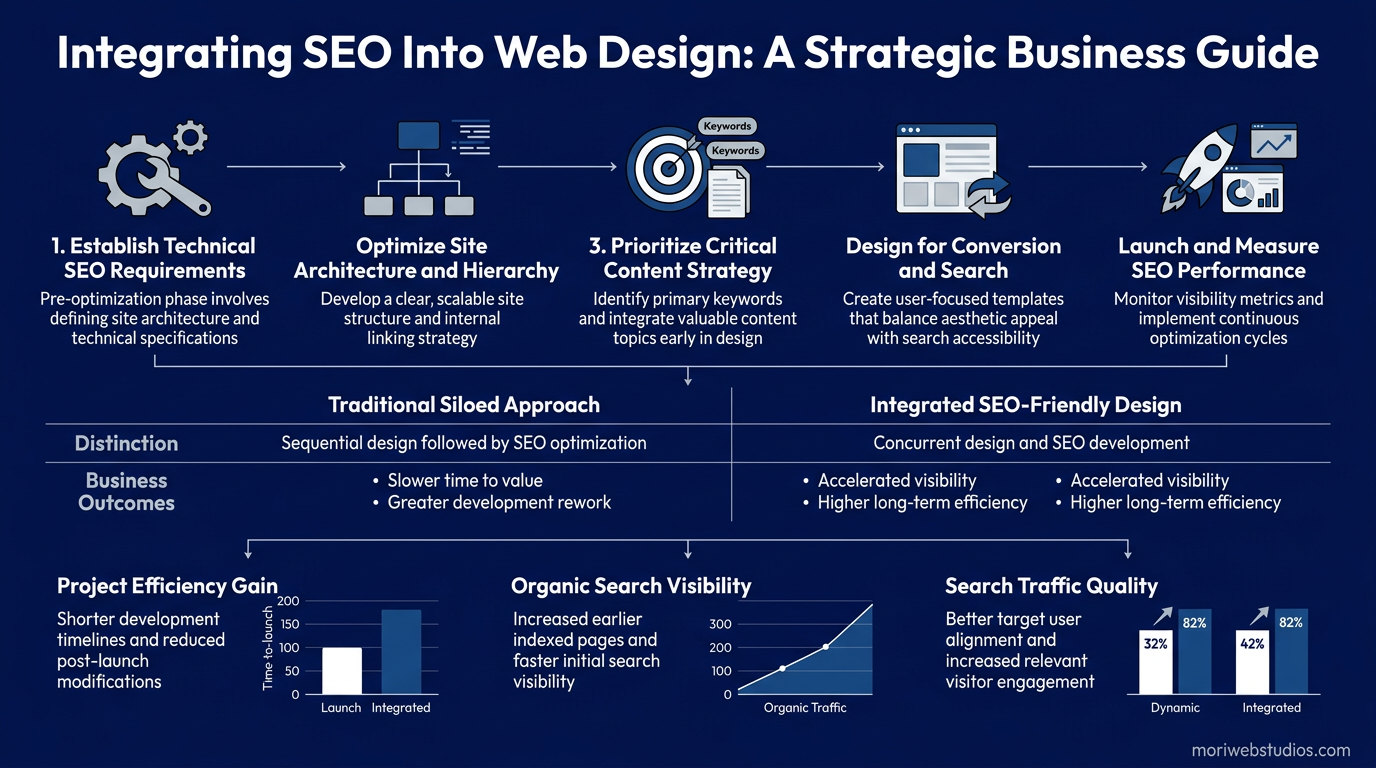
The conventional approach of building a beautiful website first and then adding SEO is a cost trap. When design decisions are made without SEO input, you end up with architectural problems that are expensive or impossible to fix later. Only 54.6% of websites pass Google’s Core Web Vitals performance standards, which means the majority of redesigns miss critical technical requirements that affect both search visibility and user experience.
The Cost of Design-First, SEO-Later Strategy
When you design without SEO in mind, several costly problems emerge. Your designer might create image-heavy pages with no alt text because they look cleaner visually. They optimize for aesthetics rather than content depth, resulting in minimal text that Google needs to understand your business. URL structures are chosen for visual simplicity rather than semantic clarity. Title tags and meta descriptions are written without keyword research. By the time you hire an SEO specialist, the site’s foundation is broken.
One of the biggest costs is URL restructuring. Change your URLs after launch, and you lose search equity you’ve built, requiring 301 redirects that take months to fully propagate. Image optimization becomes a second pass through the entire site. Navigation restructuring means reworking templates and internal link patterns. According to Fluer’s 2026 SEO research, many clients who came to post-launch SEO fixes ended up spending $3,000+ for what should have been integrated planning. They could have avoided this if SEO had been part of the initial design process.
Google’s Ranking Criteria Now Favor Integrated Design
Google’s algorithm has shifted dramatically. Your site’s visual performance and user experience are now direct ranking signals. Only 29% of AI-built websites pass Core Web Vitals, compared to 61% of hand-coded modern frameworks, showing that design quality directly impacts search performance. This means your web design choicesload speed, mobile responsiveness, layout stability, visual hierarchyare not just nice-to-haves. They’re ranking requirements.
When Core Web Vitals are poor, Google ranks your site lower, and users bounce faster. The result is a dual penalty: fewer impressions from search, and fewer conversions from the traffic that does arrive. This is why professional teams now integrate SEO from the design kickoff, not after launch.
How to Plan Web Design with SEO Built In

The right approach starts with strategy before any pixels are drawn. This means aligning design decisions with SEO requirements from the first meeting. Over 46.98% of all website traffic comes from organic search, so the foundation you build during design directly determines whether that traffic is possible. Your web design strategy should prioritize search visibility alongside visual appeal.
Conduct SEO Research Before Design Begins
Before your designer touches a wireframe, you need to understand your search opportunity. This means keyword research, competitor analysis, and search intent mapping. Which keywords do your target customers actually search? What content do they expect to find? What are competitors ranking for, and where are the gaps?
This research informs everything: site structure, content themes, page architecture, and even visual hierarchy. For example, if keyword research shows high intent around “local service near me,” your design needs to prominently surface location pages and trust signals. If your customers search for educational comparison content, your design should support a resource hub or blog section with clear information architecture.
Tools like Google Search Console, Ahrefs, and Semrush help identify keyword opportunities. But the key insight is this: design without keyword strategy means building features and content that search engines can’t properly crawl or that don’t match what users are searching for.
Build Information Architecture for Both Users and Search Engines
Site structure is where design and SEO converge most critically. Your information architecture should support clear user paths while signaling topical authority to Google. This means organizing content into clusters where related pages link to pillar pages, creating a topical relationship that Google uses to understand your expertise.
For example, a legal services site might have a pillar page on “Personal Injury Law” with clusters around “Car Accidents,” “Medical Malpractice,” and “Slip and Fall.” The design should make this relationship visual through navigation, breadcrumbs, and internal link patterns. Users get clear pathways. Google gets clear signals of topical depth.
Your URL structure, page hierarchy, and navigation labeling should all reinforce this logic. Avoid flat structures where everything is at the root level. Avoid keyword-stuffed URLs. Favor semantic clarity: /solutions/web-design/ is better than /sd1/ or /designservices/websitebuilding/. When design and SEO teams align on structure early, you avoid costly restructuring later.
Define Mobile-First Design Requirements
Mobile accounts for over 62% of global web traffic and 77% of retail visits. Google now crawls and indexes your mobile version first. This means mobile responsiveness is not optional; it’s a baseline requirement for both user experience and search visibility.
Mobile-first design means your designer creates the mobile experience first, then progressively enhances for larger screens. This constraint actually improves your design by forcing clarity and prioritization. What information is essential? What can wait? This discipline carries over to faster load times and better usability.
Mori Web Studios builds every website with mobile-first responsive design, ensuring Core Web Vitals are met and conversions are optimized across all devices. This integrated approach means your site performs well in search and converts well across the user journey.
Technical SEO Requirements That Shape Design Decisions
Certain technical SEO requirements must be built into the design and development process, not added afterward. These are not optional optimizations; they are foundational to search visibility.
Core Web Vitals and Performance Optimization
Google’s Core Web Vitals measure three critical aspects of user experience: loading speed, interactivity, and visual stability. Your design and development must prioritize these from the start. This means choosing lightweight design frameworks, optimizing images aggressively, minimizing render-blocking JavaScript, and avoiding layout shifts that frustrate users.
In practical terms, your designer should avoid large, uncompressed image files or animations that block page load. Your developer should implement lazy loading for images, code splitting for JavaScript, and caching strategies. These decisions, made during the design and build phase, determine whether you’ll pass Core Web Vitals or join the 45% of sites that fail them.
Responsive layouts also protect Core Web Vitals. When your design is truly responsive, content reflows smoothly across breakpoints without sudden shifts. This is a design discipline, not just a technical one.
Semantic HTML and Structured Data Markup
Clean, semantic HTML is critical for modern SEO. This means using proper heading hierarchy (one H1 per page, logical H2/H3 nesting), semantic tags like <article>, <section>, and <nav>, and structured data markup (Schema.org) to label entities like products, events, articles, and organizations.
Your designer might not write the HTML, but they should understand that design decisions affect code cleanliness. Overly complex layouts with nested divs create bloated, hard-to-crawl HTML. Simple, modular design systems produce cleaner code. When design and development align on simplicity, the HTML is more semantic, and Google understands your content better.
Structured data markup tells Google exactly what your page is about. A product page with price, availability, and review markup appears in rich search results and knowledge panels. A blog post with author, date, and article schema gets better AI Overview visibility. This markup should be planned during design, not retrofitted.
Image Optimization and Accessibility
Images are a design element and an SEO factor. Only 26% of websites use alt text for images, a critical miss for both accessibility and image search visibility. Your design process must include image optimization: proper file formats, responsive sizing with srcset, compression, and meaningful alt text.
This is where design and SEO merge. Images should be compressed and served at the right size for each device. Alt text should be descriptive and keyword-informed but natural. Captions should support context. When image optimization is planned upfront, you avoid the costly rework of optimizing thousands of images after launch.
Content Strategy and Design Working Together
Content and design are interdependent. Your content strategy should inform design decisions, and your design should support content goals. This alignment happens only when they’re planned together. Start with a free SEO audit to identify content gaps and opportunities that should influence your design direction.
Aligning Content Structure with Visual Hierarchy
Your design should visually prioritize your highest-intent content. If your main conversion goal is lead generation through a contact form, the design should make that form prominent and accessible. If your strategy is to build authority through educational content, your design should surface a blog or resource hub.
Heading hierarchy and visual emphasis should align. An H2 heading about a core service should also be visually prominent. A paragraph with key benefits should be styled distinctly from filler text. When content structure and visual design reinforce the same hierarchy, users and search engines both understand what matters most.
Building for Topic Clusters and Internal Linking
Modern SEO relies on topic clusters: pillar pages that cover a broad topic, with supporting cluster pages that link back to the pillar. Your design should make these relationships visible through navigation, breadcrumbs, and contextual internal links.
For example, a pillar page on “Email Marketing” might have cluster pages on “Email Templates,” “Segmentation Strategies,” and “Automation.” Your design should include a related-posts section, topic navigation, and internal links that reinforce these relationships. This isn’t just SEO architecture; it’s user experience that helps visitors explore related content. A strong SEO strategy always prioritizes this topical structure from the beginning.
Common Design Mistakes That Hurt SEO
Certain design choices, made without SEO foresight, create persistent ranking problems.
Flash, JavaScript-Heavy Sites, and Rendering Issues
While Flash is largely obsolete, many sites still use heavy JavaScript frameworks without proper server-side rendering. Google’s JavaScript rendering is improving, but crawl budget and indexation are still issues. A design that relies on client-side rendering for critical content risks Google not indexing that content properly.
The fix is simple: ensure critical content is in the HTML, not hidden behind JavaScript. Use progressive enhancement so your site works even if JavaScript fails. This is a design and development discipline that protects both user experience and search visibility.
Pagination and Filter Problems
E-commerce and directory sites often face pagination issues. If your design uses unlimited pagination or complex filter URLs, Google might waste crawl budget on parameter combinations instead of important content. Using rel=”next” and rel=”prev” helps, but the best solution is a design that surfaces important items without excessive pagination layers.
Duplicate Content and Canonical Tags
50% of websites use duplicate meta descriptions, and 54% have duplicate title tags. This happens because designers don’t template these SEO elements properly. Canonical tags should be automatically generated based on site structure, not added manually. Design systems should enforce unique title and meta patterns, not default to duplication.
Modern Tools and Frameworks for SEO-Integrated Design

The right tech stack supports SEO from the ground up. Some frameworks make SEO integration easier than others. Static site generators and headless CMS platforms can be SEO-friendly if structured correctly. WordPress with proper SEO plugins and a modern theme is still a solid choice. Next.js and other modern frameworks support server-side rendering for better crawlability.
Tools like Semrush, Ahrefs, and Google Search Console should be integrated into your workflow from day one, not added later. These tools help you track rankings, identify crawl issues, and monitor Core Web Vitals in real time.
What matters most is choosing a framework and team that understands SEO. Many agencies and freelancers still build sites without SEO consideration. Ask potential designers about their approach to Core Web Vitals, semantic HTML, and information architecture. Their answers will tell you whether they understand that design and SEO are inseparable.
Measuring Success: Metrics That Matter
Once your site is live, success metrics go beyond rankings. You should track: organic traffic growth, click-through rates from search results, time on page and scroll depth, conversion rates, Core Web Vitals scores, and crawlability metrics. According to Semrush’s 2026 AI SEO research, nearly 70% of businesses report that AI has improved their SEO ROI, suggesting that integrated, data-driven approaches are delivering results.
However, Google AI Overviews now reach 2 billion monthly users, and roughly 60% of searches yield no clicks. This means your strategy should also track visibility in AI Overviews and adjust for zero-click behavior. Your content should be formatted for answer extraction, which means clear definitions, lists, and summaries that AI systems can surface directly.
A design that supports both traditional search and AI search visibility is the modern baseline. This requires structured data, clear formatting, and authoritative content presentation from the start.
| Design Approach | SEO Foundation | Time to Results | Revision Cost | Best For |
|---|---|---|---|---|
| SEO-Integrated Design (Mori Web Studios) | Built in from day one; architecture, content, and technical SEO planned together | 3-4 months to meaningful organic traffic | Minimal; changes fit into existing structure | Businesses wanting sustainable organic growth from launch |
| Design-First, SEO-Later | Added as a retrofit; often requires structural fixes | 6-12 months to recover lost time; initial redesign penalty | $3,000-$8,000+; potential redesign of sections | Businesses without SEO knowledge at project start |
| DIY/Template-Based | Framework defaults; often sub-optimal; template limitations | Slower than either professional approach; high variance | Varies; many templates lack flexibility | Startups with no budget; acceptable for internal or short-lived projects |
| AI-Generated Sites (no QA) | Fast deployment but weak technical execution | Often slower than expected; Core Web Vitals often fail | High; usually requires redesign for performance | Speed is the only priority; not recommended for businesses seeking rankings |
The data is clear: SEO-integrated design costs less over time and delivers faster results. Mori Web Studios builds every website with this integrated approach, ensuring your design is not just beautiful but also strategically optimized for search visibility and conversion from day one.
Conclusion
Integrating SEO into web design is not optional for businesses serious about organic growth. The evidence is overwhelming: 46.98% of website traffic comes from organic search, and mobile-optimized sites see up to 40% higher conversion rates. When you separate design and SEO, you waste money on redesigns and miss months of potential traffic. When you integrate them, you build a foundation that supports both search visibility and user conversion from launch day.
The right approach means planning information architecture for SEO, building with Core Web Vitals in mind, designing mobile-first, and ensuring your content strategy aligns with your visual design. It means choosing a designer and development team that understands that these disciplines are not separatethey’re two aspects of the same goal: a website that works for both users and search engines.
If you’re planning a website redesign or new build, start by asking yourself: Is my designer talking to my SEO strategist? If not, you’re setting yourself up for costly problems later. Contact Mori Web Studios for a consultation on web design and SEO strategy tailored to your business goals. We’ll ensure your new site is optimized for search visibility and conversion from the ground up.
FAQs
Should I redesign my website if it already ranks well on Google?
Redesigning an existing site that already ranks requires extreme care to preserve your SEO equity. Many redesigns lose 30-50% of their organic traffic because of URL changes, missing redirects, or broken internal links. If your current site ranks well, the safe approach is to improve it incrementallybetter design, faster speed, improved contentwithout restructuring URLs or site architecture. Only pursue a full redesign if the current structure is fundamentally broken or if you’re moving to a new platform and can properly map all URLs with 301 redirects. When redesigning, work with a team that understands both design and SEO so you avoid losing the visibility you’ve built. Mori Web Studios specializes in redesigns that preserve and improve your existing rankings.
How long does it take to see organic traffic results after integrating SEO into a new website design?
With proper SEO integration during design, most sites see meaningful organic traffic within 3-4 months, assuming consistent content publishing and technical execution. However, the timeline depends on competition, industry, keyword difficulty, and your content strategy. Highly competitive keywords might take 6-12 months to rank. Lower-competition local searches might see results in 6-8 weeks. The advantage of building SEO in from day one is that you don’t have the additional 3-6 month delay that comes from retrofitting SEO onto a design-first site. You also avoid the ranking penalties that sometimes follow major redesigns. The key is patience and ongoing optimization, not expecting immediate results.
What’s more important for rankings: design quality or SEO optimization?
This is a false choice. Both are critical, and Google’s ranking system now treats them as inseparable. Core Web Vitals, mobile responsiveness, and loading speed are ranking factors, meaning poor design hurts your rankings directly. At the same time, proper on-page optimization, technical SEO, and content structure are essential for crawlability and relevance signals. Great design without SEO optimization means users see your site but Google can’t rank it. Great SEO without good design means you might rank but users won’t convert. The sites that dominate search results win on both fronts. This is why integrating them from the start is the smart strategy.